Know which COD orders are ready to ship before fulfillment.
Install TalabGuard for Salla, connect WhatsApp, and route each cash-on-delivery order into Ready to Ship, Needs Confirmation, No Response, Cancelled Before Shipping, or Needs Manual Review.
Connect Salla and WhatsApp
Salla order webhooks plus WhatsApp confirmation
Pre-shipping workflow
Your store
Active now
COD order #1048
199 SAR
Shipping readiness queue
Decisions before fulfillment
A COD order can look complete before it is ready to ship
The customer may not respond, the address may need review, or the order may be cancelled. The cost appears when that uncertainty reaches delivery.
Ship before confirmation
The old way
Warehouse teams ship COD orders before the customer confirms
Unclear addresses are discovered after fulfillment starts
Repeat no-response customers are hard to spot manually
Decide before shipping
The controlled way
Automatic COD detection from new Salla orders
WhatsApp confirmation before the order leaves the warehouse
Clear queues for confirmed, no-response, cancelled, and review-needed orders
Merchant outcome
Know what to ship today and what to hold before it creates avoidable delivery cost.
Instead of manually checking WhatsApp threads or preparing every COD order as soon as it arrives, TalabGuard shows one clear pre-shipping order list.
- Confirmed orders your team can prepare with confidence
- No-response orders stay out of fulfillment until follow-up
- Cancellations happen before delivery cost is spent
- Address issues surface before labels and packing
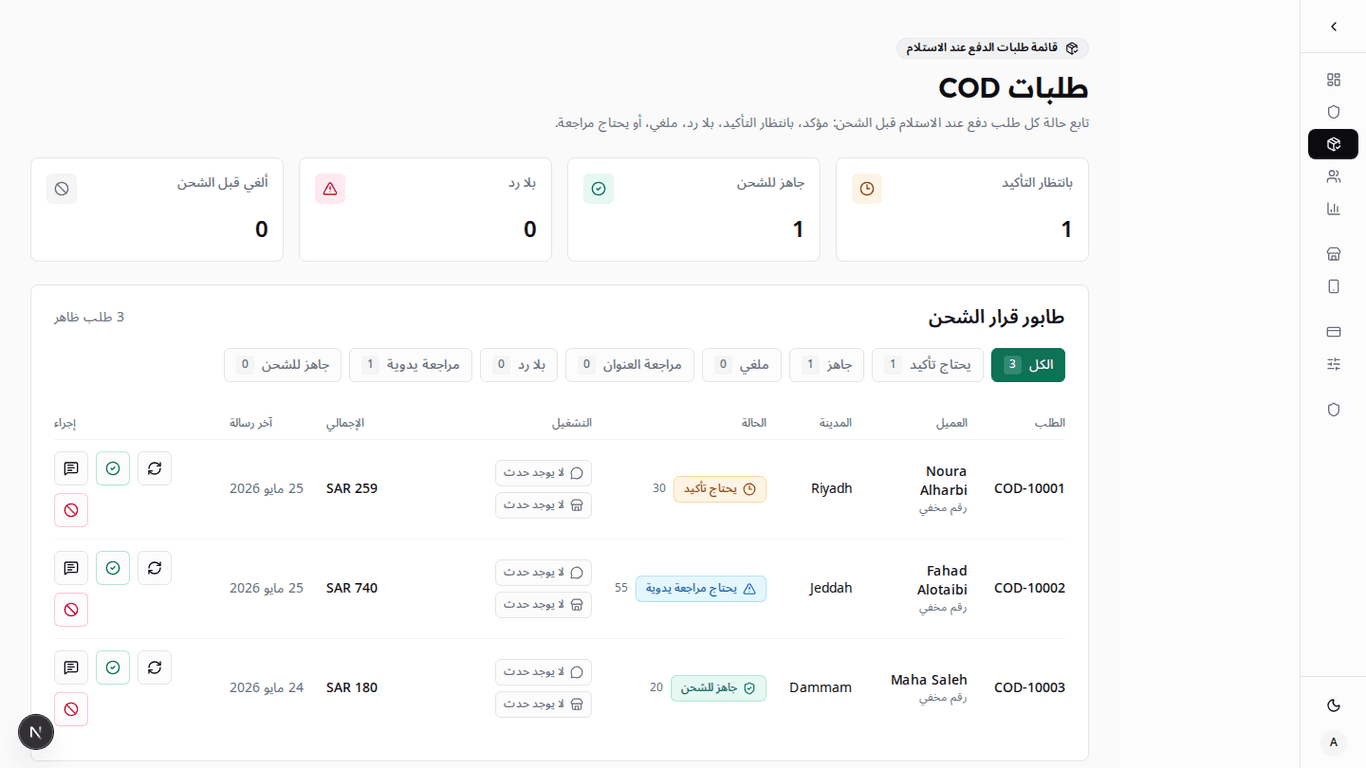
Shipping decision queue
Ready to Ship, No Response, Cancelled Before Shipping, or Needs Review.
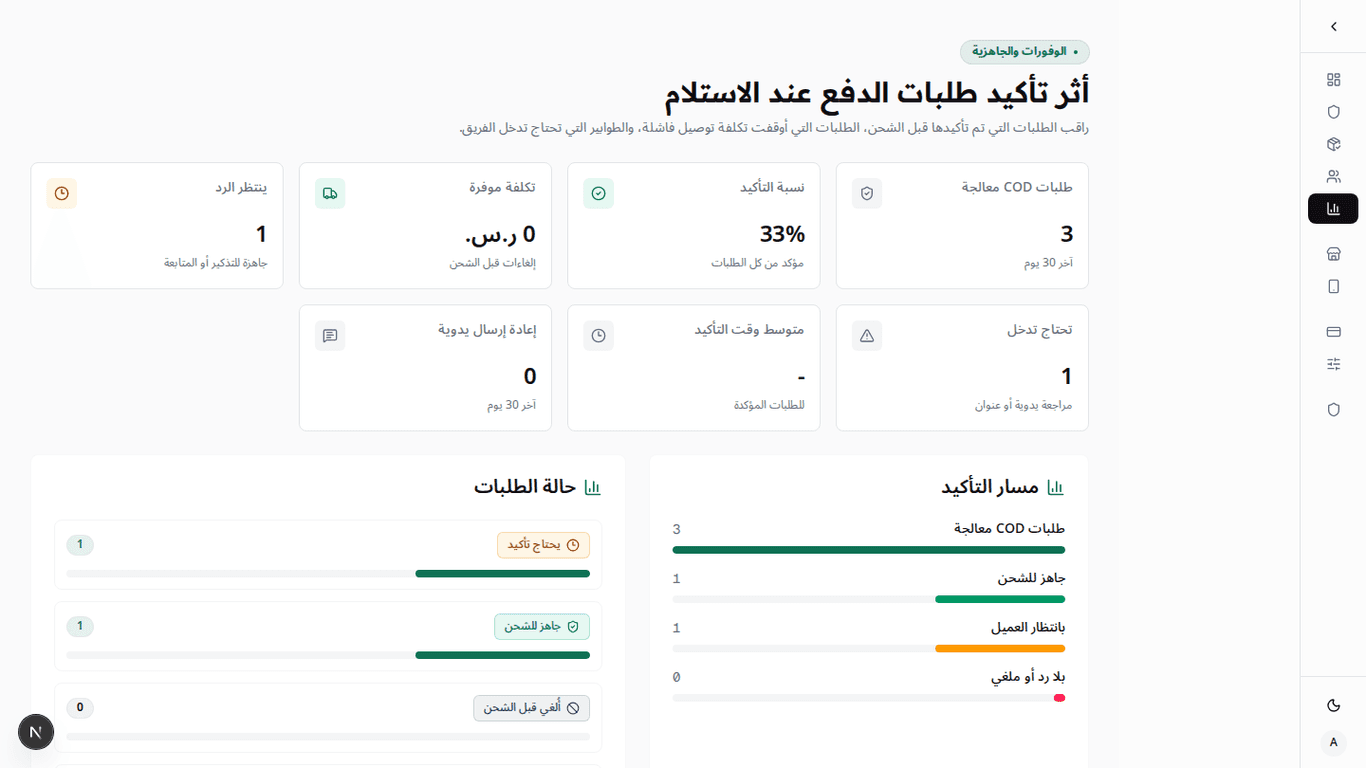
Savings you can track
Follow estimated shipping and packing cost avoided when an order is stopped before it leaves.
Turn Salla COD orders into shipping decisions.
Detect the order, classify readiness, send WhatsApp confirmation, then keep the final status visible for the team.
- 01See Salla flow
COD detection
StarterLive workflowReceive new Salla orders, fetch order details, then identify cash-on-delivery orders.
- 02See WhatsApp flow
Shipping readiness
GrowthLive workflowApply explainable rules for order value, address detail, city, and customer phone history.
- 03See saved cost
Visible ROI
ProLive workflowShow confirmed, no-response, cancelled-before-shipping orders and estimated delivery cost saved.
Use cases
Explore TalabGuard by the problem you want to solve.
Each page focuses on one merchant need: Salla connection, WhatsApp confirmation, failed delivery cost, Saudi COD workflows, or app setup.
Salla COD confirmation
For merchants searching for a Salla-specific way to confirm cash-on-delivery orders before shipping.
WhatsApp COD confirmation
For teams that already use WhatsApp and need replies to become clear order decisions.
Reduce failed COD deliveries
For operators focused on avoiding no-response shipments, unclear addresses, and preventable delivery cost.
Saudi COD confirmation
For Saudi Salla stores that need Arabic-first copy, right-to-left pages, and local COD workflow language.
Salla app install path
For merchants evaluating what happens after install: Salla, WhatsApp, rules, testing, and order review.
Designed for COD shipping decisions
From confirmation to cancellation and no response, every order state stays visible before fulfillment.
Confirmed orders are clear, so the team knows what can be prepared without extra calls.
Ready to Ship
Operating state
Fashion store
Relevant to workflows in
A clear shipping decision for every COD order
Plans start at SAR 99 per month. Stop unconfirmed orders before fulfillment, know what is ready to ship, and track estimated shipping cost avoided.
Each COD order is counted once, including its confirmation message, reminder, reply outcome, and shipping status.
Every plan includes the complete pre-shipping workflow. You only choose the monthly order capacity your store needs.
Start with your current COD volume and upgrade only when the number of orders you need to follow grows.
Starter
For stores that want a clear decision before shipping
99
SAR / mo
A practical break-even point
This plan can cover its price after avoiding about 4 failed shipments, assuming SAR 30 for each shipment.
Your pre-shipping decision workflow
Detect COD orders, confirm on WhatsApp, follow no-response cases, sync the result to Salla, and track estimated avoided cost.
- Follow up to 300 COD orders before shipping
- Know which orders are ready to ship
- Hold no-response and cancelled orders before fulfillment
- Track estimated shipping cost avoided
Subscription is managed in Salla
Salla shows the active trial and billing terms before installation.
Growth
For active stores reducing daily follow-up work
249
SAR / mo
A practical break-even point
This plan can cover its price after avoiding about 9 failed shipments, assuming SAR 30 for each shipment.
Your pre-shipping decision workflow
Detect COD orders, confirm on WhatsApp, follow no-response cases, sync the result to Salla, and track estimated avoided cost.
- Follow up to 1,000 COD orders before shipping
- Reduce manual confirmation work every day
- Keep no-response orders out of fulfillment
- Best value for active COD stores
Subscription is managed in Salla
Salla shows the active trial and billing terms before installation.
Pro
For high-volume stores protecting fulfillment capacity
499
SAR / mo
A practical break-even point
This plan can cover its price after avoiding about 17 failed shipments, assuming SAR 30 for each shipment.
Your pre-shipping decision workflow
Detect COD orders, confirm on WhatsApp, follow no-response cases, sync the result to Salla, and track estimated avoided cost.
- Follow up to 3,000 COD orders before shipping
- Keep a high-volume shipping queue organized
- Priority onboarding support
- Track avoided shipping cost at scale
Subscription is managed in Salla
Salla shows the active trial and billing terms before installation.
A processed order may end as Ready to Ship, No Response, Cancelled Before Shipping, Address Review, or Manual Review. It still creates value when it prevents an unclear order from reaching fulfillment.
Prices are monthly in SAR and exclude VAT where applicable. There are no setup fees or usage add-ons in the current version.
Savings are estimates, not guarantees. Use your actual delivery, return, packing, and handling cost in the dashboard for a more accurate result.
Website checkout is not available yet. Install and manage the active subscription through the Salla App Store.
The current version uses WhatsApp confirmation only. Voice, text messages, and prepaid conversion are not part of the current public offer. No setup fees or usage add-ons in the current version.
TalabGuard keeps Salla, WhatsApp, order, and customer-phone data inside the operating workflow; marketing analytics are not sent WhatsApp message text, QR payloads, tokens, order contents, or customer PII.
Frequently Asked Questions
Start with one clear COD shipping queue
Connect Salla and WhatsApp, activate confirmation rules, then review Ready to Ship, No Response, and Manual Review orders from one dashboard.
Test confirmation replies and reminders before using the workflow on live COD orders
